
An architectural design website should help a prospective client understand the practice’s work and decide whether to make contact. For a Wexford practice, strong project photographs need supporting information about the services offered, the people involved and the areas served. Plan those elements together so someone considering an extension, renovation or new home can find a relevant starting point.
Start with the types of work the practice takes on. A homeowner considering a rear extension may look for different examples from someone planning a new dwelling. Use recognisable project descriptions in the navigation and introductions, rather than relying on unfamiliar internal terminology.
Explain where the practice works and distinguish office locations from the area it serves. If you have more than one office, show the relevant contact details clearly. Use local project examples where available, while describing the actual location accurately.
Outline the stages of work your practice provides, using language someone starting a building project can follow. Explain where initial discussions, design development and later support fit within your offer. Have the practice approve the descriptions so the website reflects the services it actually provides.
Make the scope clear where another professional or specialist is involved. A visitor should understand what they can discuss with your team without assuming that every possible service is included. Keep any explanation of appointments or project stages consistent across service pages and contact information.
Select projects that represent the work you want visitors to understand. For each one, prepare a short introduction explaining the type of project, the broad location and the practice’s contribution. Describe what changed where the business can confirm it, such as an extension, renovation or outdoor living area.
Give the project a clear name and use categories that help someone explore similar work. Keep proposed designs, work in progress and completed projects identifiable. A visualisation should be labelled so the visitor understands what it represents, and project descriptions should match the images selected.
Agree which images the practice can publish and record any credits that should accompany them. Choose a useful sequence, with an overall view followed by details that explain the design. Check crops on narrow screens so an important part of a building is not lost.
Use captions where they add context, and give informative images text alternatives that convey their purpose. Keep the main project explanation in readable page text. Where drawings or documents are offered, label them clearly and avoid making a large download the only way to understand the work.
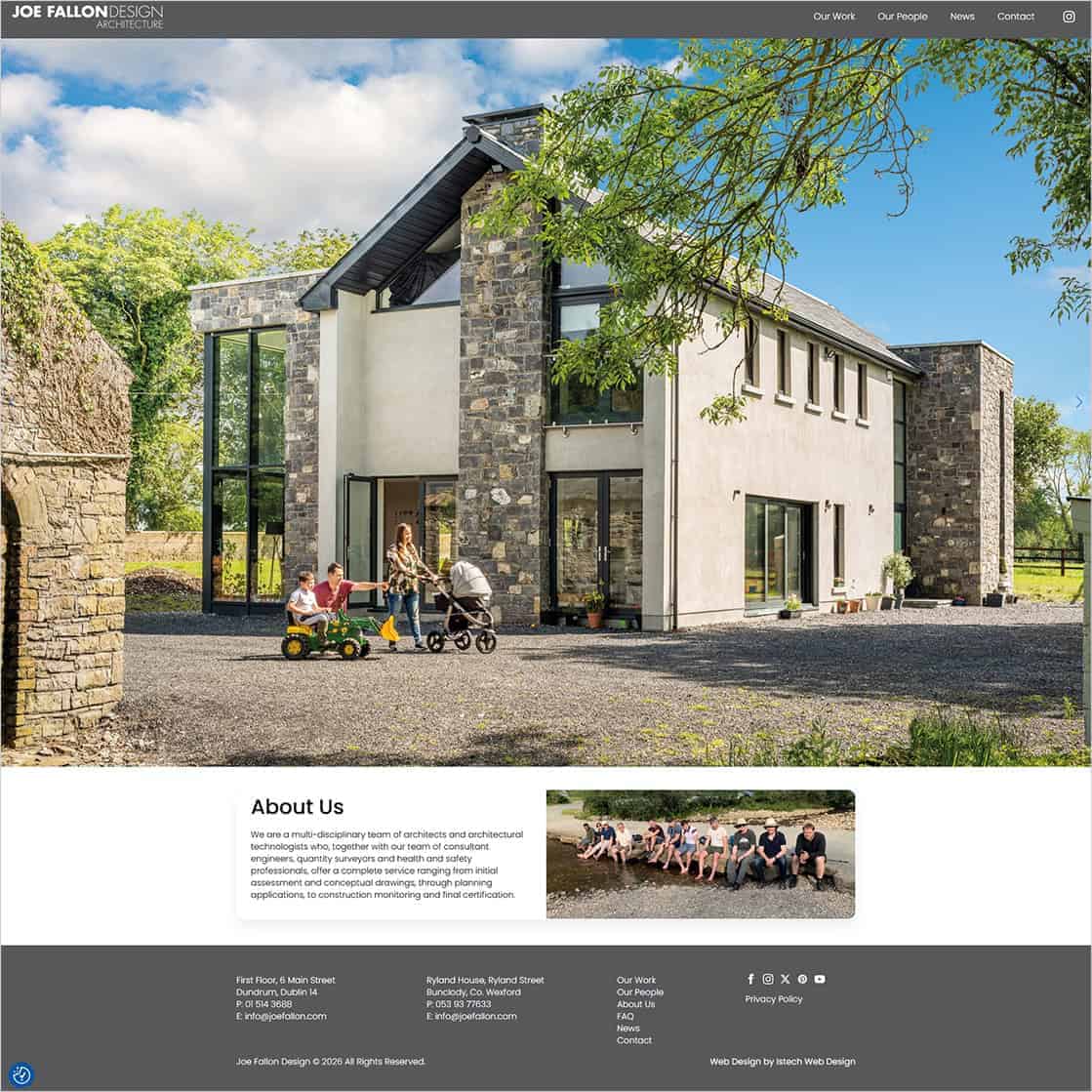
Joe Fallon Design has offices in Bunclody, Co. Wexford, and Dundrum, Dublin. We built its website, which gives visitors routes to Our Work, Our People, News and Contact. The homepage introduces the practice’s services alongside project photography and office contact details.
The Our Work section groups projects into categories including Single Storey, Two Storey and Outside Living. Named entries combine photographs with short descriptions of the work, such as renovations and extensions. The Bunclody entry is identified as a new dwelling. A separate Our People section presents team roles and biographies.
For another Wexford design practice, the useful lesson is to plan the project collection and practice information together. A visitor can explore the kind of work that interests them, learn who is behind the practice and find the appropriate contact route. Prepare the supporting descriptions as carefully as the photographs.
Explore Joe Fallon Design’s project collection and practice team page.
Use current portraits and short biographies to explain each person’s role. Have the practice confirm job titles, qualifications and any professional memberships before publishing them. Describe experience that is relevant to the work shown, using details the team can substantiate.
Keep the distinction between team members and external consultants clear where it matters. Visitors should understand how the people presented relate to the practice, without needing a long account of the internal organisation.
Place a clear contact link beside relevant services and project examples. Explain what an initial enquiry is for and what information would help your team understand the proposed work. Keep the first step manageable for someone whose ideas are still taking shape.
Give visitors a phone or email alternative and check that each office’s details are current. Where a form is used, its confirmation should explain what happens next without suggesting that an appointment or project has already been accepted.
For more detail on choosing fields and checking delivery, see our Wexford quote request form planning guide.
Review the journey on a phone from the project index to an individual example and the contact route. Check that image galleries work with touch controls, captions are readable and visitors can return to the collection. Review page loading with the actual photographs in place.
Agree who approves new projects and updates team information. Keep a record of the text, selected images and credits for each addition. Update descriptions when a project’s status changes so the portfolio continues to represent the practice accurately.
To plan your practice website, explore our web design service for Wexford businesses or contact Istech about your requirements.